> ## Documentation Index
> Fetch the complete documentation index at: https://docs.dataframer.ai/llms.txt
> Use this file to discover all available pages before exploring further.
# Data Anonymization
> Detect PII, PHI, financial data, identity documents, and more—then redact your datasets using AI models and pattern-based rules
Up to **99.999%** detection accuracy across supported entity types, combining AI model recognition with pattern-based rules.
Starting at **\$0.10 per million tokens** processed. Only detected and transformed tokens count toward usage.
DataFramer's detection and anonymization feature scans your datasets for sensitive information and redacts it:
* **Detection** — identify sensitive entities across your data, combining AI model recognition with pattern-based rules
* **Anonymization (redaction)** — replace detected entities with mask tokens to remove sensitive information
Detection covers seven categories of sensitive information:
* **Personal** — First name, last name, date of birth, dates, age, gender, nationality, race/ethnicity, marital status
* **Contact** — Email, phone number, street address, postal/ZIP code, city, state, country
* **Financial** — SSN, credit/debit card, bank routing number, routing number, tax ID, IBAN
* **Digital** — IP address, URL, username, password, MAC address, device identifier
* **Identity Documents** — Passport number, license/certificate number, national ID, voter ID
* **Medical / PHI** — Medical record number, diagnosis, medication, health plan number, patient ID, lab result
* **Professional** — Company name, occupation, employee ID, salary
## Creating a job
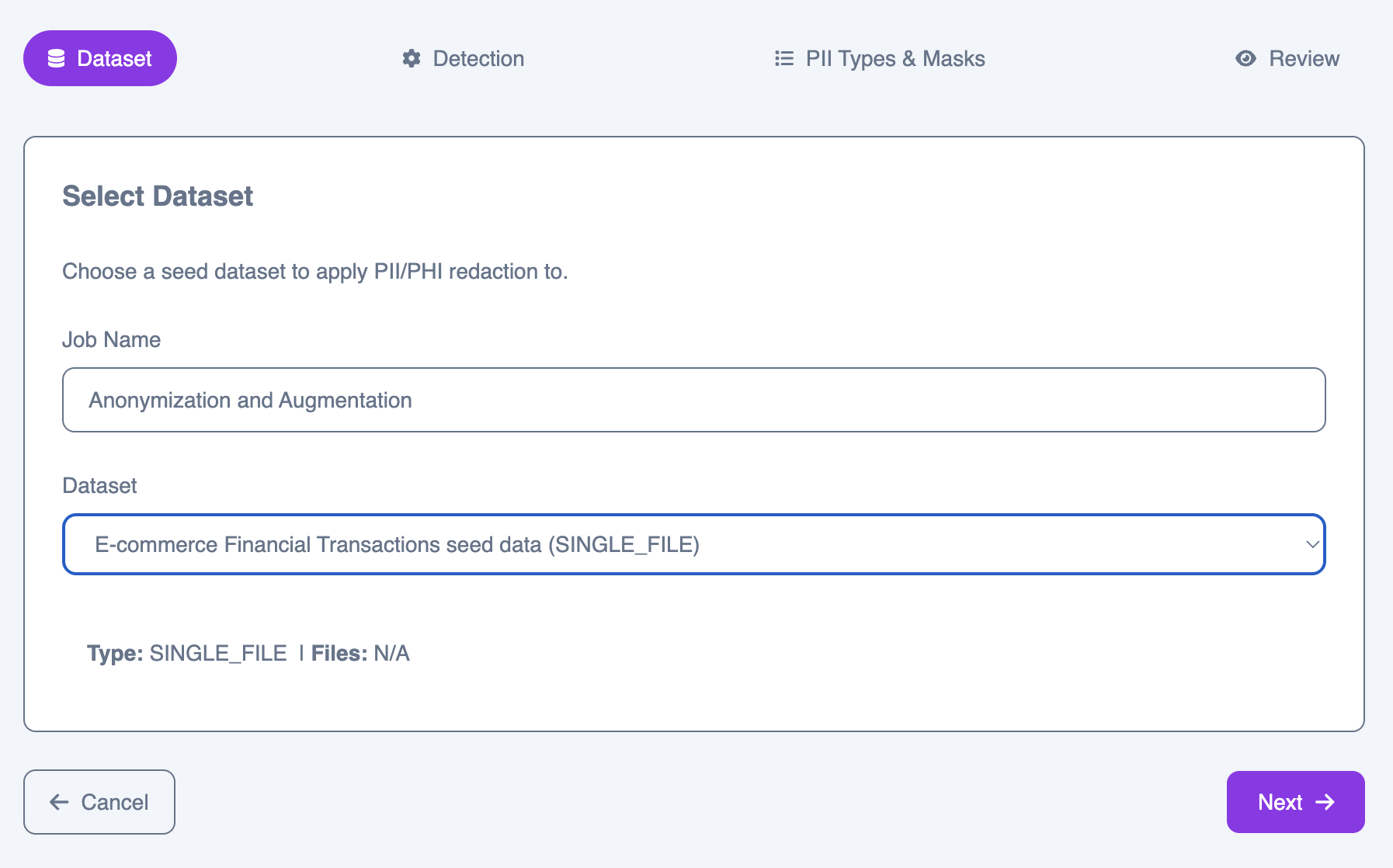
### Step 1: Select dataset
Choose a seed dataset from your library as the input for the job.
 ### Step 2: Detection configuration
Configure how sensitive entities are detected and which model evaluates the results.
### Step 2: Detection configuration
Configure how sensitive entities are detected and which model evaluates the results.
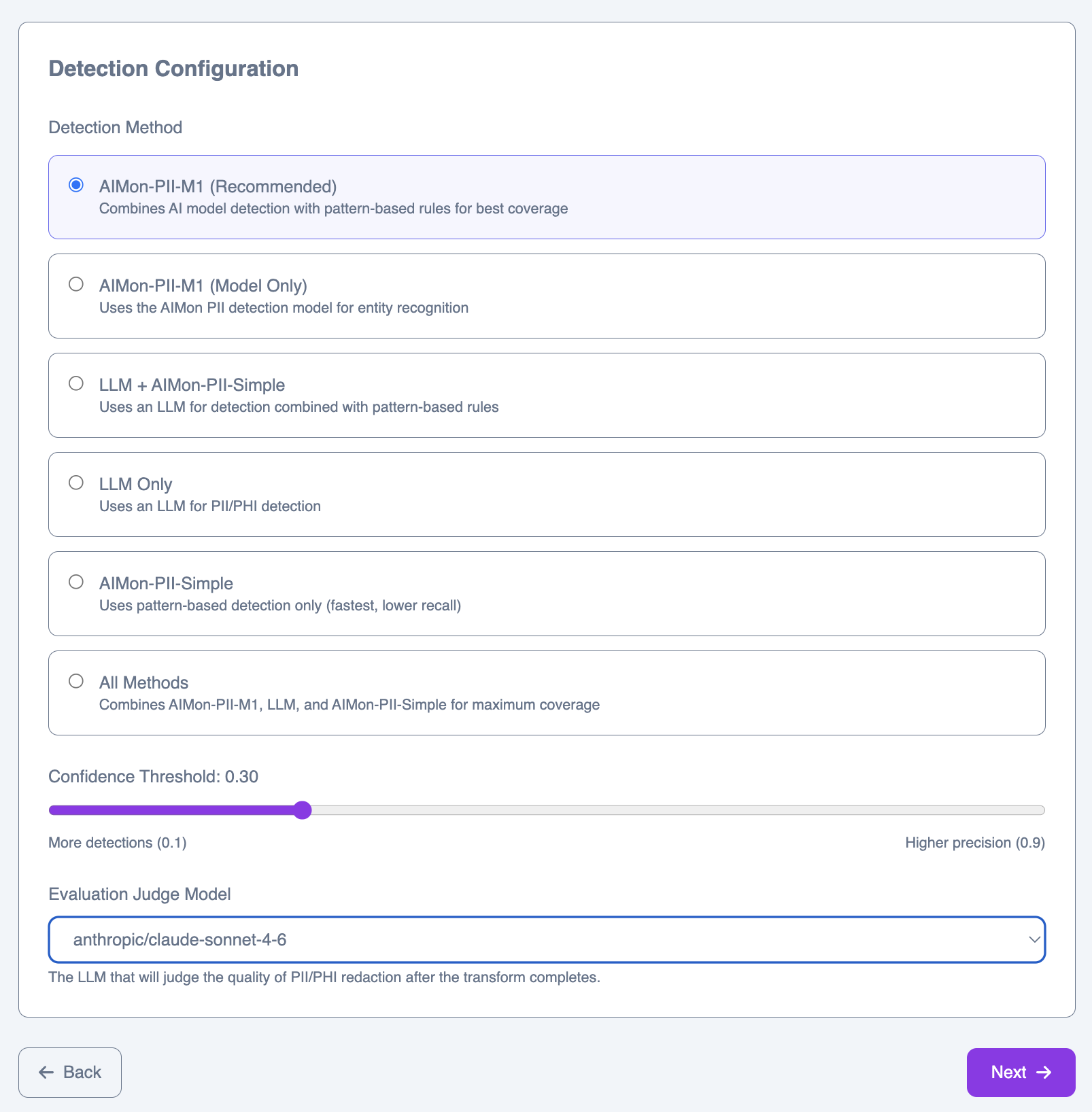 #### Detection methods
Uses the PII-M1 detection model exclusively, relying on learned entity recognition without rule-based augmentation.
Delegates all detection to an LLM. The most flexible option for unusual or domain-specific entity types.
Combines PII-M1, LLM, and Heuristics in a union. Best for maximum coverage when false negatives are unacceptable.
#### Confidence threshold
The confidence threshold controls the trade-off between recall and precision. Lower values (e.g., 0.1) produce more detections with more potential false positives. Higher values (e.g., 0.9) produce fewer detections but with higher certainty. The default of 0.30 works well for most datasets.
#### Evaluation judge model
After the job completes, an LLM evaluates the quality of the results. Select the model to use for this evaluation.
### Step 3: Entity types & masks
Select which entity types to detect and configure the mask token each one is replaced with in the output.
#### Detection methods
Uses the PII-M1 detection model exclusively, relying on learned entity recognition without rule-based augmentation.
Delegates all detection to an LLM. The most flexible option for unusual or domain-specific entity types.
Combines PII-M1, LLM, and Heuristics in a union. Best for maximum coverage when false negatives are unacceptable.
#### Confidence threshold
The confidence threshold controls the trade-off between recall and precision. Lower values (e.g., 0.1) produce more detections with more potential false positives. Higher values (e.g., 0.9) produce fewer detections but with higher certainty. The default of 0.30 works well for most datasets.
#### Evaluation judge model
After the job completes, an LLM evaluates the quality of the results. Select the model to use for this evaluation.
### Step 3: Entity types & masks
Select which entity types to detect and configure the mask token each one is replaced with in the output.
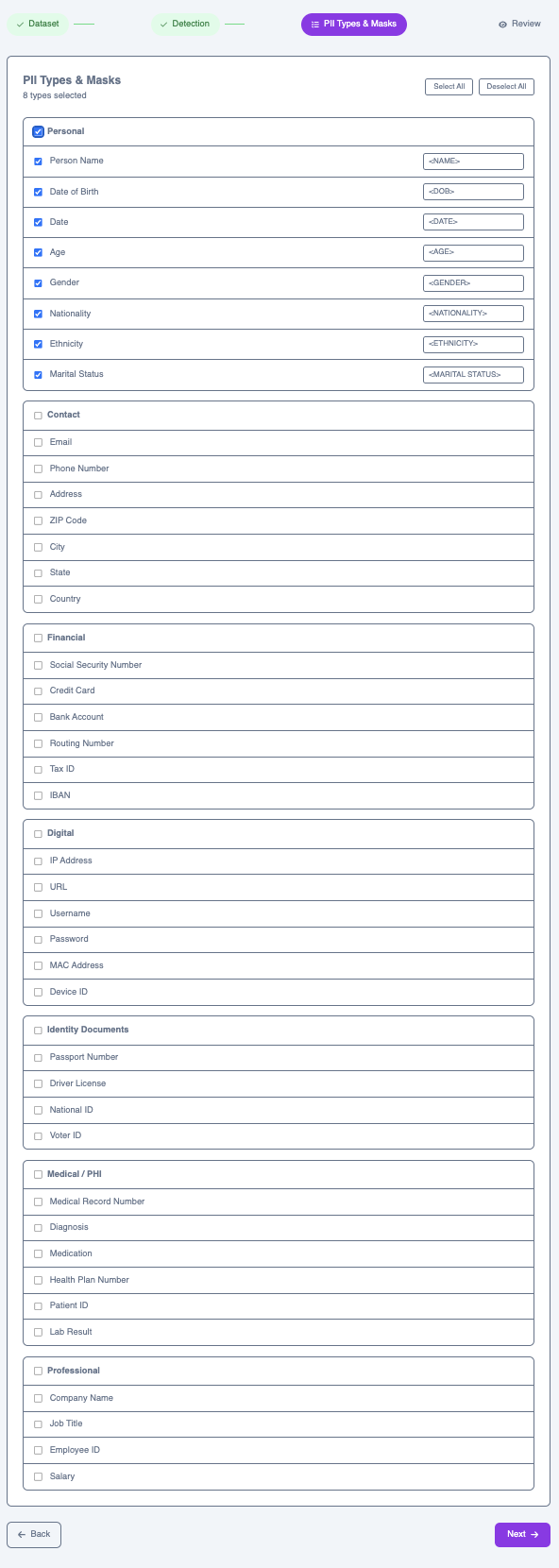 The full set of supported entity types is organized by category:
First Name, Last Name, Date of Birth, Date, Age, Gender, Nationality, Race / Ethnicity, Marital Status
Email, Phone Number, Street Address, Postal / ZIP Code, City, State, Country
Social Security Number, Credit / Debit Card, Bank Routing Number, Routing Number, Tax ID, IBAN
IP Address, URL, Username, Password, MAC Address, Device Identifier
Passport Number, License / Certificate Number, National ID, Voter ID
Medical Record Number, Diagnosis, Medication, Health Plan Number, Patient ID, Lab Result
Company Name, Occupation, Employee ID, Salary
Each selected type maps to a mask token in the output—for example, `first_name → ` or `date_of_birth → `. You can customize the mask token for each type.
### Step 4: Review & submit
Review your full configuration before submitting. The summary shows your full configuration—dataset, detection method, threshold, evaluation model, and all selected entity types with their mask tokens.
The full set of supported entity types is organized by category:
First Name, Last Name, Date of Birth, Date, Age, Gender, Nationality, Race / Ethnicity, Marital Status
Email, Phone Number, Street Address, Postal / ZIP Code, City, State, Country
Social Security Number, Credit / Debit Card, Bank Routing Number, Routing Number, Tax ID, IBAN
IP Address, URL, Username, Password, MAC Address, Device Identifier
Passport Number, License / Certificate Number, National ID, Voter ID
Medical Record Number, Diagnosis, Medication, Health Plan Number, Patient ID, Lab Result
Company Name, Occupation, Employee ID, Salary
Each selected type maps to a mask token in the output—for example, `first_name → ` or `date_of_birth → `. You can customize the mask token for each type.
### Step 4: Review & submit
Review your full configuration before submitting. The summary shows your full configuration—dataset, detection method, threshold, evaluation model, and all selected entity types with their mask tokens.
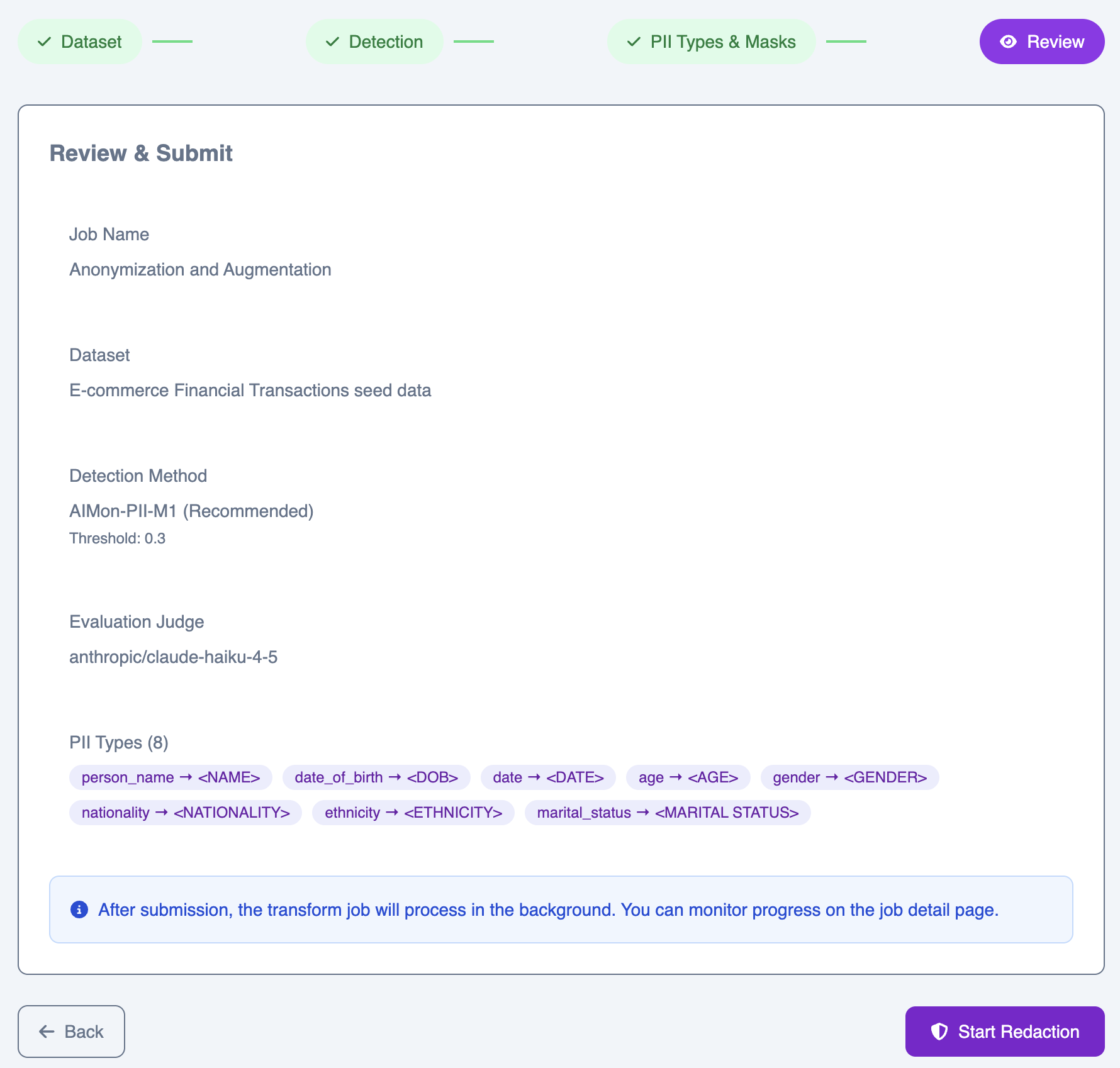 After submission, the job runs in the background. You can monitor progress on the job detail page.